

Sync Re-Re-Ported


About
Sync is a mod that allows players to make clones of themselves, called "shells". Each shell has its own inventory, health, hunger, and even gamemode. Players can transfer, or "sync" their consciousness into these shells to exchange inventories, quickly travel between different locations, and even escape death.
This mod is a remake of the original Sync mod by iChun. This version of the mod was made for the Desolate Planet modpack as a balanced way to provide more lives in hardcore mode.
History
The concept for Sync originally started with the Sync webseries by Corridor Digital. iChun adapted this into the original Sync mod, which was eventually remade.
On modern versions, the Sync mod has passed hands many times. It was remade on Fabric for 1.17-1.19, abandoned, picked up by palm1 and ported to 1.20, abandoned again, picked up by me to fix a variety of bugs. Then, it was ported to Forge by VTSumik and abandoned again. Finally (for now), I picked it up again to fix more bugs and add some mod compatibilities.
Each new port brought about major improvements but also new bugs, which this version hopefully serves as the solution for. As of writing this description, none of the other versions are maintained, so I am updating my forks of the mod to fix some bugs. However, if someone else takes this project back from me, theirs may end up better than mine. I recommend using whichever version of Sync has been updated the most recently. That may be this one, or maybe someone else has improved upon it since this description was written.
Unique to this version of Sync on Forge
Features of the Forge version that are not present in the other Forge 1.20.1 version.
- Compatibility with Diet and Thirst Was Taken.
- Fixed a bug where syncing would fail when using shaders.
- Shell storage no longer requires a power source when the shellStorageConsumption is set to 0 in the config.
- Syncing is now possible even if your original body dies (a new config option, mustMaintainOriginalBody, can be changed to revert this).
Unique to this version of Sync on Fabric
Features of the Fabric version that are not present in the other Fabric 1.20.1 version.
- Completed shells in the shell constructor are now valid destinations to sync to upon death, instead of only shells in storage.
- Sync no longer causes a server crash in multiplayer (from https://github.com/cassiancc/sync-fabric).
- More modded power sources now work with the shell constructor.
- Shell storage no longer requires a power source when the shellStorageConsumption is set to 0 in the config.
- Fixed crash that occurred when there were multiple pages of available shells to sync to (above 8).
How to play
- You need to craft a
shell constructorand place it down. - Then you need to provide it with a genetic sample (simply right-click it).
⚠️WARNING: with the default config, this action will KILL you! In order to create a shell with full health, the constructor must absorb 20HP (40 for Hardcore players). If you don't want to die, you can eat a golden apple to increase your maximum health, or you can hold a totem of undying during the process (which is the only option for Hardcore players with default settings). - The shell constructor needs power to work. You can use other modded power systems or use a
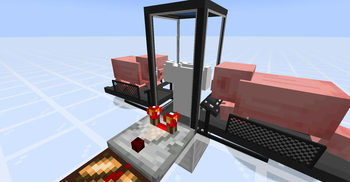
treadmill, touching any side of the shell constructor. Lure apig, awolf, or certain hostile mobs to its center to start generating piggawatts. - Once your new shell is constructed, you need to craft a
shell storageand place it down. - Supply it with
redstone power. - Once doors of the shell storage are open, you can
walk into it. - You'll see a radial
menuthat displays your shells Selectthe shell you want to transfer your mind into, and enjoy the process!
Notes
- You can color-code shells stored in shell storages. Just right-click a shell storage with dye.
- Syncing works cross dimensional, and should support custom dimensions.
- If you die while using a shell, you'll be immediately synced with your original body (if you still have one; otherwise your mind will be transferred to a random shell).
- Death of a shell doesn't increase your death counter.
- Shell can be equipped (or unequipped) with armor, tools, etc. via hoppers connected to a corresponding shell container.
- Shell storage should be constantly supplied with power in order to keep stored shell alive (configurable).
- Shell storage can be powered by redstone, if the
shellStorageAcceptsRedstoneoption is set totrue. - Shell storage can be powered by any valid energy source (e.g., treadmills, machinery from popular tech mods, etc.).
- It's possible to measure a shell container's state with a comparator.
- You can determine progress of the shell construction process via strength of the comparator output.
- You can measure the fullness of a shell's inventory via strength of the comparator output.
- You can change a comparator output type by right-clicking on a shell container with a wrench.
- Shell storage and shell constructor are pretty fragile, so don't try to mine them without
silk touchenchantment.
Crafting recipes
Sync Core:

Shell Constructor:

Shell Storage:

Treadmill:

Sync Configuration
Forge
The mod is highly configurable. The config is located at ./config/sync-common.toml and by default looks like this:
#Sync Configuration
[general]

	#Shell Construction Settings
	[general.construction]
		#Enable instant shell construction (creative mode-like)
		enableInstantShellConstruction = false
		#Warn player instead of killing them on sync failure
		warnPlayerInsteadOfKilling = false
		#If syncing on death will be blocked if an original (non-constructed) body died
		mustMaintainOriginalBody = false
		#Damage dealt by fingerstick (0-100)
		#Range: 0.0 ~ 100.0
		fingerstickDamage = 20.0
		#Damage dealt by fingerstick in hardcore mode (0-100)
		#Range: 0.0 ~ 100.0
		hardcoreFingerstickDamage = 40.0
		#Item required to construct a new shell (format: 'modid:itemname', e.g., 'minecraft:ender_pearl')
		#Leave empty to disable item requirement
		shellConstructionRequiredItem = ""
		#Number of items consumed when constructing a shell
		#Range: 1 ~ 64
		shellConstructionItemCount = 1
		#Should the required item be consumed in creative mode?
		consumeItemInCreative = false
		#Custom error message when missing required item (use %s for item name, %d for count)
		missingItemMessage = "You need %s x%d to construct a new shell!"

	#Shell Storage Settings
	[general.storage]
		#Energy capacity of shell constructor
		#Range: 1000 ~ 9223372036854775807
		shellConstructorCapacity = 256000
		#Energy capacity of shell storage
		#Range: 10 ~ 9223372036854775807
		shellStorageCapacity = 320
		#Energy consumption per tick for shell storage
		#Range: 0 ~ 1000
		shellStorageConsumption = 16
		#Whether shell storage accepts redstone power
		shellStorageAcceptsRedstone = true
		#Maximum ticks shell storage can run without power
		#Range: 0 ~ 1200
		shellStorageMaxUnpoweredLifespan = 20

	#Energy Generation
	[general.energy]
		#Entity energy output mapping (format: 'modid:entity=energyAmount')
		energyMap = ["minecraft:chicken=2", "minecraft:pig=16", "minecraft:player=20", "minecraft:wolf=22", "minecraft:villager=25", "minecraft:creeper=80", "minecraft:enderman=160"]

	#Gameplay Settings
	[general.gameplay]
		#Priority for shell selection (NATURAL, NEAREST, or color names)
		#Allowed Values: WHITE, ORANGE, MAGENTA, LIGHT_BLUE, YELLOW, LIME, PINK, GRAY, LIGHT_GRAY, CYAN, PURPLE, BLUE, BROWN, GREEN, RED, BLACK, NEAREST, NATURAL
		syncPriority = "NATURAL"

	#Tools
	[general.tools]
		#Item to use as wrench (format: 'modid:item')
		wrench = "minecraft:stick"

	#Client Settings
	[general.client]
		#Automatically update translations
		updateTranslationsAutomatically = false
		#Enable camera animation when switching between shells
		enableShellSwitchAnimation = true
		#Enable camera animation when respawning into a shell after death
		enableDeathRespawnAnimation = true

	#Easter Eggs
	[general.easter_eggs]
		#Enable Technoblade easter egg
		enableTechnobladeEasterEgg = true
		#Render Technoblade's cape
		renderTechnobladeCape = false
		#Allow Technoblade announcements
		allowTechnobladeAnnouncements = true
		#Allow Technoblade quotes
		allowTechnobladeQuotes = true
		#Delay between Technoblade quotes (in ticks)
		#Range: 200 ~ 72000
		technobladeQuoteDelay = 1800
		#UUIDs of players to treat as Technoblade
		technobladeUuids = []
Fabric
The mod is highly configurable. Cloth Config API is required to make changes on the fabric version. The config is located at ./config/sync.json and by default looks like this:
{
  "enableInstantShellConstruction": false,
  "warnPlayerInsteadOfKilling": false,
  "fingerstickDamage": 20.0,
  "hardcoreFingerstickDamage": 40.0,
  "shellConstructorCapacity": 256000,
  "shellStorageCapacity": 320,
  "shellStorageConsumption": 16,
  "shellStorageAcceptsRedstone": true,
  "shellStorageMaxUnpoweredLifespan": 20,
  "energyMap": [
    {
      "entityId": "minecraft:chicken",
      "outputEnergyQuantity": 2
    },
    {
      "entityId": "minecraft:pig",
      "outputEnergyQuantity": 16
    },
    {
      "entityId": "minecraft:player",
      "outputEnergyQuantity": 20
    },
    {
      "entityId": "minecraft:wolf",
      "outputEnergyQuantity": 24
    },
    {
      "entityId": "minecraft:creeper",
      "outputEnergyQuantity": 80
    },
    {
      "entityId": "minecraft:enderman",
      "outputEnergyQuantity": 160
    }
  ],
  "preserveOrigins": false,
  "syncPriority": [
    { "priority": "NATURAL" }
  ],
  "wrench": "minecraft:stick",
  "updateTranslationsAutomatically": false
}
| Name | Description | Default value |
|---|---|---|
enableInstantShellConstruction |
If this option is enabled, creative-like shells will be constructed immediately, without the use of energy | false |
warnPlayerInsteadOfKilling |
If this option is enabled, a player won't be killed by a shell constructor if they don't have enough health to create a new shell | false |
fingerstickDamage |
The amount of damage that a shell constructor will deal to a player when they try to create a new shell | 20.0 |
hardcoreFingerstickDamage |
The amount of damage that a shell constructor will deal to a player in the Hardcore mode when they try to create a new shell | 40.0 |
shellConstructorCapacity |
The amount of energy required to construct a new shell | 256000 |
shellStorageCapacity |
Determines capacity of a shell storage's inner battery | 320 |
shellStorageConsumption |
Energy consumption of a shell storage's life support systems (per tick) | 16 |
shellStorageAcceptsRedstone |
If this option is enabled, a shell storage can be powered by redstone | true |
shellStorageMaxUnpoweredLifespan |
Determines how many ticks a shell can survive without a power supply connected to the corresponding shell storage | 20 |
energyMap |
Specifies a list of entities that can produce energy via treadmills | (see above) |
preserveOrigins |
If this option is enabled, all user shells will share the same origins | false |
syncPriority |
The order of shell selection for synchronization in case of death Available priority values:
|
[{ "priority": "NATURAL" }] |
wrench |
Identifier of an item that can be used as a wrench in order to change a shell constructor's state | minecraft:stick |
updateTranslationsAutomatically |
If this option is enabled, translations will be updated every time the game is launched | false |
You can edit any of these values directly in the config file or via ModMenu.
Translations

Sync makes use of crowdsourced translations.
You can help translate the mod to additional languages here: crowdin.com/project/sync-fabric.
License
This mod is licensed under the MIT License. You can find more about the MIT license on this website.
The original Sync mod by iChun is under the GNU LGPLv3 license. Since the project is not a port, but a reimplementation with its own unique codebase, Kir_Antipov got permission to change the license to MIT.
