
StorageWorkbench




Craft from your storage room, not from your pockets.
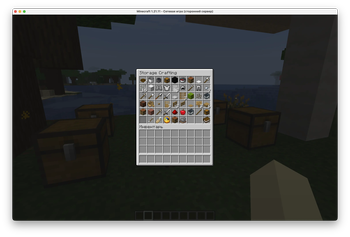
StorageWorkbench turns a normal crafting table into a storage-aware crafting station. Put chests near the workbench, fill them with materials, and craft through a vanilla-compatible server menu without manually carrying every ingredient.
It is built for Paper servers that want a practical storage quality-of-life upgrade while keeping the game friendly to Java players and Bedrock players connecting through Geyser.
Why Try It
| Without StorageWorkbench | With StorageWorkbench |
|---|---|
| Move ingredients into your inventory before crafting. | Craft directly from nearby chests. |
| Stop when your inventory is full. | Craft output goes to inventory when possible, or drops near the player if needed. |
| Search through storage manually. | Use recipe categories, sorting, pagination, and refresh. |
| Java-only UI tricks can break for Bedrock players. | Uses vanilla server inventory screens and vanilla items. |
| Storage rooms are just storage. | Storage rooms become crafting rooms. |
How It Works
- Place a crafting table near your chests.
- Sneak-right-click the crafting table.
- Pick a recipe from the Storage Crafting menu.
- StorageWorkbench consumes ingredients from the player inventory and nearby chests.
- Crafted output is placed in the player inventory when possible.
Regular right-click still opens the normal vanilla crafting table.
Players can also look at a crafting table and run:
/swb open
Core Features
| Feature | Details |
|---|---|
| Storage crafting menu | Server-side inventory GUI opened from normal crafting tables. |
| Nearby chest support | Uses items from the player inventory and nearby chests. |
| Direct chest consumption | Chest ingredients are consumed directly from storage, not moved into the player inventory first. |
| Full inventory support | Crafting still works when the player inventory is full. |
| Categories | All, Building, Tools, Combat, Redstone, Food, Transport, Ingredients, Misc. |
| Sorting | Name, Available, Output, Category. |
| Max crafting | Shift-left-click crafts the maximum available amount. |
| Controller-friendly max mode | A max-mode button helps Bedrock/Xbox players use maximum crafting. |
| Chest highlights | Included chests get lightweight vanilla particle highlights while the menu is open. |
| Multiplayer-aware sessions | Each player has an independent crafting session. |
Designed For Vanilla-Compatible Servers
StorageWorkbench does not require:
- Client mods
- Resource packs
- Custom textures
- Custom fonts
- Custom packets
- External services
- Databases
- Telemetry
The menu uses normal server inventory screens made from vanilla items. This is intentional: it keeps the plugin practical for mixed Java and Bedrock communities using Geyser/Floodgate.
Compatibility
| Target | Support |
|---|---|
| Platform | Paper |
| Minecraft versions | 1.21.x and 26.1.x |
| Java for 1.21.x servers | Java 21 |
| Java for 26.1.x servers | Java 25 or newer |
| Client-side install | Not required |
| Resource pack | Not required |
| Dependencies | None |
| Geyser/Floodgate | Designed around vanilla server inventory screens for better cross-client behavior. |
StorageWorkbench is not a Fabric or Forge mod. It is a Paper plugin and should be installed on the server.
Chest Search Range
Default range around the crafting table:
| Direction | Blocks |
|---|---|
| North | 5 |
| South | 5 |
| East | 5 |
| West | 5 |
| Up | 5 |
| Down | 0 |
Horizontal directions use world axes because crafting table blocks do not have a facing direction. Diagonal chests inside the resulting rectangular area are included.
Server operators can change the range through commands or in plugins/StorageWorkbench/config.yml.
Commands
Player command:
| Command | Permission | Description |
|---|---|---|
/swb open |
storageworkbench.use |
Opens the storage crafting menu while looking at a crafting table. |
Admin commands:
| Command | Permission | Description |
|---|---|---|
/swb status |
storageworkbench.admin |
Shows plugin status and active sessions. |
/swb range show |
storageworkbench.admin |
Shows the current chest search range. |
/swb range default |
storageworkbench.admin |
Restores the default range. |
/swb range horizontal <blocks> |
storageworkbench.admin |
Sets all four horizontal directions at once. |
/swb range set <north|south|east|west|up|down> <blocks> |
storageworkbench.admin |
Sets one direction. |
/swb reload |
storageworkbench.admin |
Reloads the plugin config. |
Permissions
| Permission | Default | Purpose |
|---|---|---|
storageworkbench.use |
Everyone | Allows using StorageWorkbench crafting. |
storageworkbench.admin |
Operators | Allows changing StorageWorkbench settings in game. |
Installation
- Stop the Paper server.
- Back up the server folder, especially
world,world_nether,world_the_end,plugins, and config files. - Copy
storage-workbench-1.0.0.jarinto the serverpluginsfolder. - Start the server.
- Adjust
plugins/StorageWorkbench/config.ymlif needed.
Default configuration
enabled: true

storage-range:
  north: 5
  south: 5
  east: 5
  west: 5
  up: 5
  down: 0

storage-menu-enabled: true
highlight-chests-enabled: true
highlight-batch-size: 12
highlight-ticks-between-batches: 2
highlight-refresh-ticks: 20
borrow-custom-chest-items: false
debug-logging: false
Performance
StorageWorkbench is built to avoid repeated expensive world scans:
- Chest discovery runs per player storage crafting session.
- The plugin scans loaded chunk tile entities instead of every block in the search volume.
- Recipe availability is based on a compact material index built from current inventory contents.
- Chest particles are batched and only active while the storage crafting menu is open.
- Item consumption checks the current chest slot state before taking items.
Safety
StorageWorkbench does not generate chunks, edit blocks, rewrite world files, migrate world data, use a database, or make external network calls.
Still, any plugin that moves items should be tested carefully before use on a valuable live world.
Recommended rollout:
- Make a full server backup.
- Test on a copied world or separate test server.
- Test normal crafting table behavior.
- Test sneak-right-click storage crafting.
- Test full inventory behavior.
- Test two players crafting from the same nearby chest area.
- Install on the live server only after the copied-world test looks correct.
Known Limitations
- A server plugin cannot add new tabs to the client-side vanilla recipe-book panel in a Java/Bedrock-compatible way without a client mod or resource pack.
- StorageWorkbench uses a server-side inventory menu with vanilla item buttons instead.
- The legacy vanilla recipe-book preview mode exists as a fallback but is disabled by default.
- Some unusual custom recipes or heavily customized item metadata may not behave like simple vanilla shaped and shapeless recipes.
License
StorageWorkbench is released under the MIT License.
